

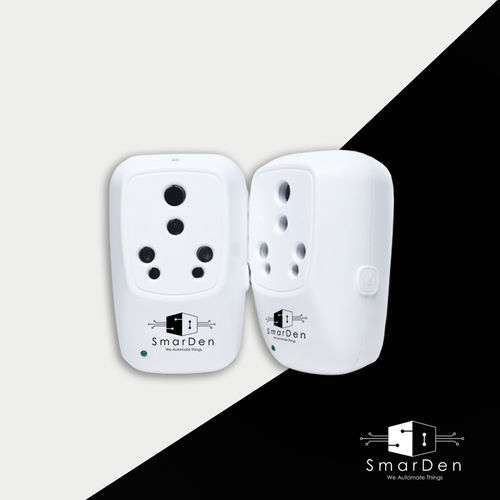

Smarden Hydra A 16a Wifi Smart Plug Application: Home Automation
Price: 2864.10 INR / Piece
(2427.20 INR + 18% GST)
Get Latest Price
MRP:
2960.00 INR / Piece
Weight :
90.00 Gram
1 Pack Contains :
1
Minimum Pack Size :
34

In Stock
Product Specifications
| Product Type | SmarDen Hydra aEUR" 16A WiFi Smart Plug |
| Application | Home Automation |
| Frequency (MHz) | 50/60 Hertz (HZ) |
| Pkg Box Height | 4.20 cm |
| Returnable | No |
| Weight | 90.00 Gram |
| Pkg Box Length | 6.10 cm |
| Price | 2427.20 INR (Approx.) |
| Pkg Box Breadth | 9.90 cm |
| Price Type | fixed |
| Currency | INR |
| Moq | 34 |
| Mop | 34 |
| Brand Name | SmarDen |
| Stock Quantity | 100 |
| Product Unit | 34 Piece/Pieces |
| GSTIN | 18% |
| Shipping Type | free |
| MRP | 2960.00 INR |
| Unit Type | Piece/Pieces |
| Packsize | 1 |
| Minimum Order Quantity | 34 |
| Minimum Ordered Packs | 34 |
Product Overview
Key Features
The Technical Specifications of the Smart Plug is as follows:
Power input:240V AC, 50/60Hz.
Total Power Input:16A
Maximum Resistive Load:2500W
Maximum Inductive Load:1000W
Maximum Current per Channel:16A
Power measurement accuracy: A 5W
Operating distance from Wi-Fi router upto 30 meters*: (depending upon routera s placement)
Operating temperature:0A Cto 70A C
Socket type:Indian model
Plug type:Indian 16A model
Dimensions:61.8mm x 99mm x 42mm
Pin Standard:BS 546 Type M (Indian standard large three-pin)
Socket Standard:BS 546 Type D & M Combo (Indian standard large and small three-pin)
Communication Wi-Fi:Connects to 2.4 GHz, Wi-Fi 802.11 b/g/n
Features:
Works Remotely: The device works remotely with the SmarDen Mobile application and it can be controlled from anywhere in the world. The User can control all the nodes individually from anywhere.
Scheduling: The user can schedule any individual load connected to the devices i.e. Lights, bulbs, fans, etc. to turn on/off at a specific time. Once the schedule is set the device will follow the instructions at that specific time. The user can also repeat the schedules to make it work throughout the week and at any point in time.
Routines: The User can also create a Routine depending on the requirements. In a particular routine, the user can set multiple appliances to turn on/off at a specific time of the day. Once the routine is set the devices will attain their state at that point in time. For eg. I can create a routine to turn on the Fan and turn off the lights in my room at 9 AM in the morning.
Auto-off timer: The user can also set auto-off timers for a specific appliance to turn off after a particular time. For eg. I can set the auto-off timer to turn off the lights in 50 mins.
History: The user can also check the history of any individual appliance, the history report will tell the user about the switching details of that particular appliance. In the history details, the user will get to know about the time at which the appliance is turned on/off and it will also tell a WHOa controlled the appliance. For eg. If I manually turned on the light at 9 AM, then in the history it will be updated as a manual off Action has been taken on lights at 9 AM, or if any of my family members controlled the device from the mobile app, Ia ll get to know who controlled the device and at what time the action has been taken.
Add Family Members: The prime user of the Mobile application can add multiple family members in the app so that all the members of the family have complete access to all the devices present at their home.
Running Time: The user will also be able to check the number of running hours of all the individual devices from the mobile application.
Voice Control: All the devices can be controlled via google assistant and Amazon Alexa and you can also add Siri shortcuts to control the devices with Siri as well.
Scenes: The user can also create a scene to make specific adjustments to the devices and with a single tap of a button the scene will be executed. For eg. I can create a party scene in which I can turn on the TV, dim the lights, turn on the AC and make the volume of the soundbar 100%.
Workflows: In the workflows, the user can create a workflow based on the sensor values. In the workflows, the user can control multiple appliances to turn on/off based on the sensor value. For eg. I can create a workflow that will turn on the AC and turn off the LED lights Automatically when the Temperature in my living room is above 26 degrees Celsius.
Device Warranty Status: The User doesna t need to worry about the warranty cards anymore, the warranty status of each device can be checked from the SmarDen mobile app itself.
Company Details
We are the engineers of this generation. We provide a working and progressive environment in our workspace. This is reflected in our products, values and ethics. Working constantly towards the upgrades and durability of our end user products, which ultimately cuts down the expense on consumer end. The R&D of our company is a never ending process. Its the backbone to this project. With our products and solutions we are converting the existing homes to Smart Homes.
Business Type
Manufacturer, Supplier
Employee Count
20
Establishment
2016
Working Days
Monday To Saturday
GST NO
06AAACZ9836A1ZB
Payment Mode
Cash in Advance (CID)
More Product From This seller

Seller Details


GST - 06AAACZ9836A1ZB
 Rating
Bahadurgarh, Haryana
Director
Mr Parveen Kumar
Address
SCO No. 5, Neel Factory Market, MIE Part A, Near Metro Pillar 769, Bahadurgarh, Haryana, 124507, India
Report incorrect details